Overview
Magnetite is a model-based development tool for safety-critical embedded software written in Rust. You build discrete-time control models on a canvas, in text, or both at once, and compile them to clean, dependency-free Rust, with simulation, export and traceability built in.
The name covers three things:
- The
magscriptlanguage, a domain-specific language for synchronous data-flow models. Every diagram you draw ismagscriptunderneath, and you can write it by hand instead. - The
magnetCLI, which holds:- the compiler and the simulator;
- the sync between a diagram and its text;
- the exports;
- the editor’s server.
- The editor, a browser-based block-diagram editor served by
magnetitself, where you build, simulate and deploy.
A project lives on your disk, defined by its Magnet.toml as a Rust crate is by its Cargo.toml.
Nothing is stored in the cloud: magnet reaches the network to activate a license and to let
cargo fetch dependencies, and for nothing else. You keep your projects under your own version
control, which the plain-text magscript and the JSON layout files are made for.
Where to start
Section titled “Where to start”-
Install
magnetwith the command your dashboard shows for your seat, then:Terminal window magnet new hello && cd hellomagnet guiYour browser opens on a live canvas. Place blocks, wire a feedback loop, press Run, and watch the probed signals plot. The quickstart walks you through it in five minutes.
-
The guides build real controllers feature by feature, with copyable
magscriptthroughout. -
The reference answers targeted questions about:
- the
magnetCLI; Magnet.toml;- the
magscriptlanguage; - every built-in block.
- the
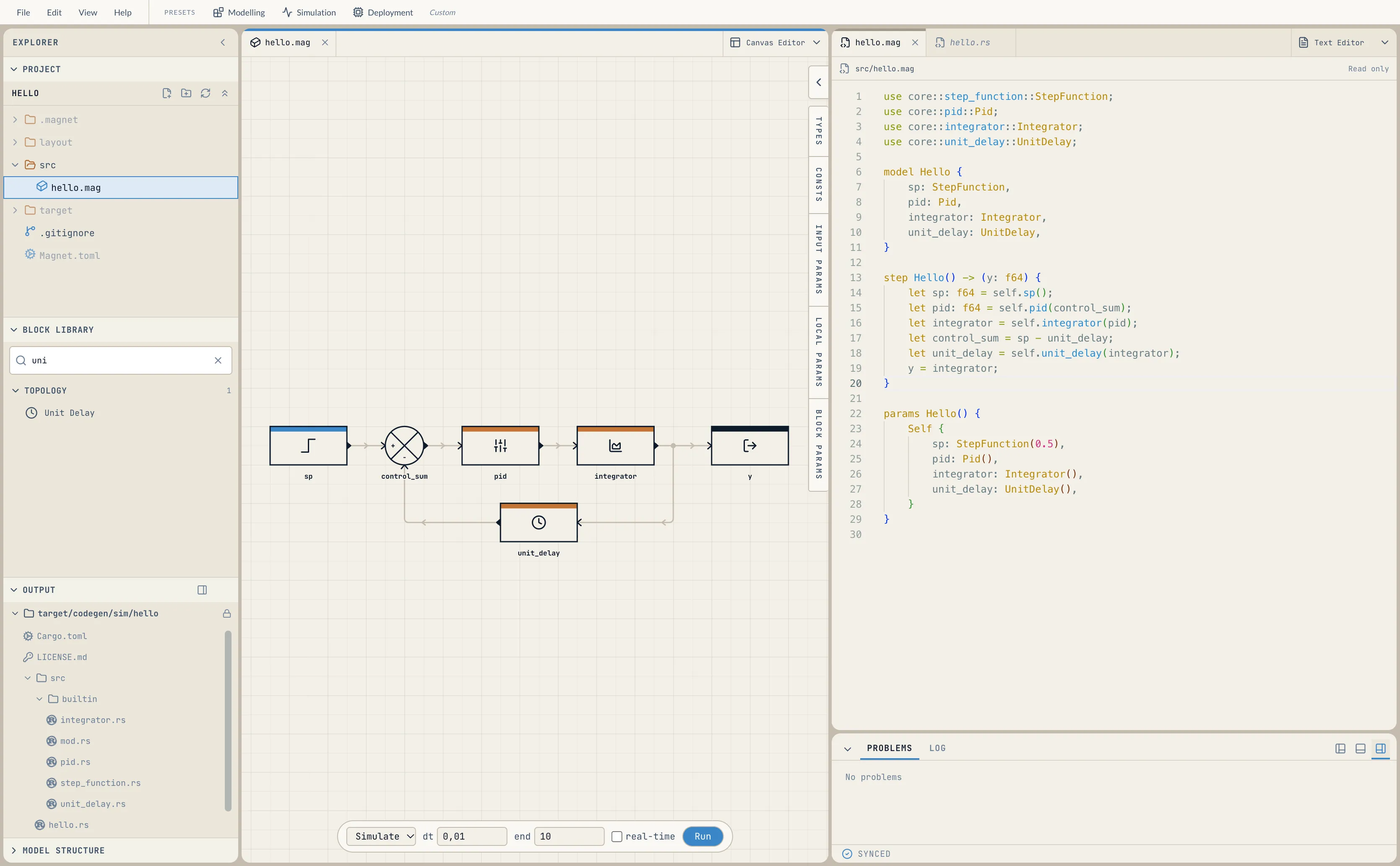
The canvas and the text are one artifact: everything the mouse does is written into your package’s .mag, and everything you type there renders back onto the canvas.